Pierluigi Paganini
 October 11, 2026

Bitdefender researchers discovered a campaign called Midnight Mimosa involving preinstalled Android malware on low-cost phones from different brands that use MediaTek platforms. The malware is built into the device firmware and may be hidden in different system packages depending on the model. It is already on the phone before the owner turns it on for the first time and cannot be removed.
The malware has system-level privileges, allowing it to install and remove apps, grant permissions and download code from a remote server without the user’s knowledge. This gives its operators control over the infected devices and allows them to use them for different purposes, including building a large botnet. The campaign appears to be mainly financially motivated.
“This scheme is likely designed mainly to generate revenue. The operators carry out ad and click fraud, collect device and installed-app information, and turn infected devices into residential-proxy relay nodes, making them zombies in botnets.” Bitdefender states. “This creates an additional revenue stream, as access to botnets for DDoS attacks is a hot commodity. The larger the botnet, the more money they can charge.”
The money comes from several places. The operators run ad and click fraud, collect device and installed-app information, and turn infected phones into residential proxy relay nodes. Botnet access for DDoS attacks is a hot commodity, and the larger the botnet, the more they can charge.
The system app doesn’t register the fraudulent clicks itself. The revenue comes from cover apps it drops onto the phone, such as real-looking weather, app-lock, note and OCR apps. Those load genuine ads through a legitimate ad SDK, while an invisible window on top registers ads being shown, and the ad network credits the cover app, not the hidden component.
Bitdefender spotted it through behavior, not a signature. A package called com.android.system.lite looked like a core Android component but didn’t act like one: it repeatedly enabled sensitive access, including Accessibility and Notification Access, and silently installed and removed unrelated apps. It had no icon and an app label of just “System”, and its real machinery sat in a native library that only woke up at runtime.
“The investigation began with App Anomaly Detection, a technology in Bitdefender Mobile Security, which flagged com.android.system.lite: a package carrying the name and appearance of a core system component while behaving like nothing of the sort.” continues the cybersecurity firm. “Most mobile security still runs on a single assumption: scan an app, and if it’s deemed clean, it’s safe. Bitdefender’s App Anomaly Detection (introduced in 2023) exists because, in practice, the theory often doesn’t hold up. Apps can sit dormant and turn hostile weeks later, sometimes only if certain conditions are met (targeted malware). Such apps can pass every static check, only to later pull their real payload from a server or cleverly unpack it from native code.”
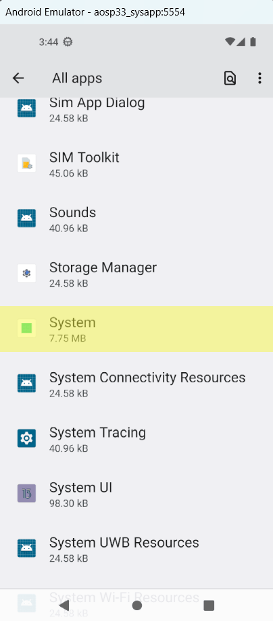
The first package discovered was only one version of the malware. The same core code was also found in packages named com.android.sys.prot, com.android.sys.gmsprot and com.android.sys.bcprot, with different digital signing certificates. Bitdefender explains that the main threat is not the package name itself, but the malicious code shared by all these versions.
The malware can silently install at least 32 different apps disguised as useful tools, including app lockers, weather apps, file managers, icon tools, OCR tools and audio editors. It gives itself access to Android’s Accessibility, Notification Access and SMS read/write features. Bitdefender did not observe the malware using the notification or SMS permissions, but the operators could activate them when needed. The malware also repeatedly enables and disables these permissions after short periods.
The install trick is neat and nasty. Before dropping a payload app, the malware disables the Google Play Store app, apparently to dodge Play Protect, then re-enables it afterward, and a safety net turns it back on when the user is present so nothing looks odd. It can also record Google Play as the install source for apps that never came from Play, though real Play apps carry a server-side signature block called frosting, and the forged ones don’t have it.
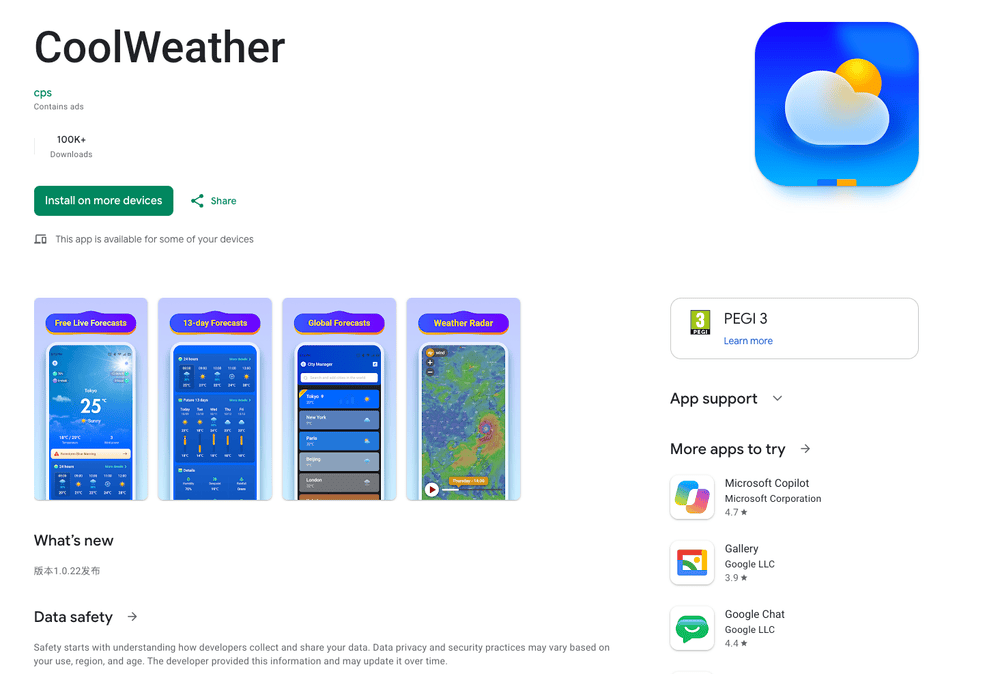
Under the hood, a native library called libeasy.so decrypts a hidden framework, which fetches a remote configuration from a command server disguised as a weather API. The framework then loads further plugins that run the in-process ad fraud and the silent installs, and it can update itself with new code from the server. The plugins and payloads travel as files with misleading extensions, like JARs named .o and APKs served as .png, so a sample examined offline often holds no active payload at all.
The ad fraud is tunable. The plugin shows ads in full-screen activities and overlays nobody asked for, triggered when the screen turns on or by commands from the operator. It marks those surfaces as secure, so they don’t show up in screenshots or screen recordings, and it fires synthetic clicks with daily caps and timing limits to look organic. The cover apps act as peers in an ad mesh, so one app can drive impressions that another app renders and gets paid for.
One payload app, com.mobile.applock.en, is something else entirely: a single-purpose TCP proxy with no ads and no interface that enrolls the phone as a relay node.
“Our insights reveal these payload applications being installed and removed repeatedly on the same devices. This churn helps the operation reduce the length of time a payload remains visible in the app list, rotate hashes, and change the active monetization module, while the underlying system component stays in place.” states the report. “Beyond generating revenue for operators, the devices can be turned into residential-proxy relay nodes, essentially becoming part of botnets and potentially helping launch DDoS attacks when called upon.”
It connects to a control host over raw TCP on port 6000, rotates across four domains, and pipes traffic between the controller and whatever target the server names. Bitdefender notes an erratum here: the IP it first reported as the control server turned out to be a sinkhole, not a command server.
The campaign relays on Google Play to target Android users. Thirteen apps published there talk to the same servers, under at least two developer accounts and thirteen different signing certificates. They passed Play review, they provide some real function, and they also show ads outside the app, sometimes while the phone sits idle. They don’t have the privileges of the preinstalled packages, but Bitdefender calls them dangerous anyway.
Scale is large. Over roughly two years, the family showed up on thousands of unique devices in more than 150 countries, led by Mexico, France and Italy, followed by the United States, Germany, Brazil and Spain. Two separate regional centers with a long tail behind them is what hardware moving through international online marketplaces looks like, not a single carrier’s channel.
“As we mentioned earlier, Zediel-signed firmware is not the only way malware is shipped. The operators use many other devices, most of them likely visual clones of real phones, to embed the same malware.” states the report. “Beyond the generic user agent strings, many of the affected models are counterfeit devices that borrow flagship names they have nothing to do with. Fake iPhones include: “i17 Pro Max”, “i16_Pro_Max”, or “17_Pro_Max”, and an “iPadAirPro” for the tablet line.“
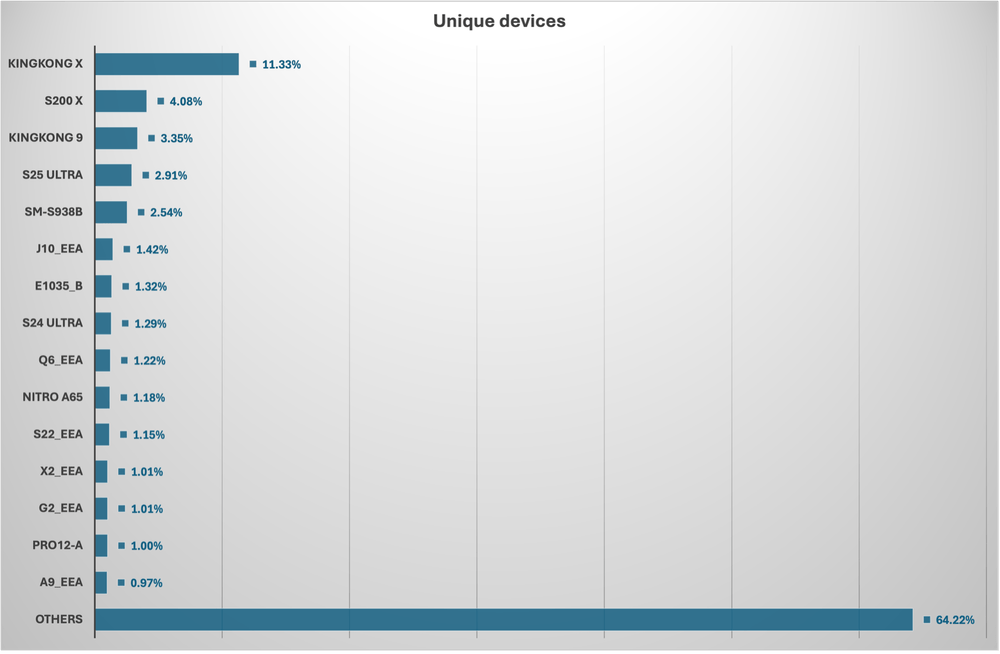
The phones are often fake models. Some report names such as “i17 Pro Max,” “S25 Ultra” and “Note 18 Ultra,” even though these models do not exist. Others use fake codes that make them look like real Samsung devices. The two most common models are from budget brands: Doogee’s S200 X and Cubot’s KINGKONG X. A public discussion on the XDA forum also describes users finding a hidden com.android.sys.* package that returned under a different name after they removed it.
Who installed the malware? Many affected phones use firmware signed with certificates linked to Shenzhen Zediel. Bitdefender confirmed that these certificates were used to sign firmware on affected devices, but it could not establish how the malware got there or whether the certificate owner knew about it. Other infected phones do not use Zediel-signed firmware, so the malware could have been added by a device manufacturer, a firmware integrator, a logistics partner or another party in the supply chain.
The activity also has a longer history. Bitdefender linked the malware’s infrastructure, through shared domains, to Dr.Web’s Android.Joker family in 2021 and its Android.Phantom and Click families in 2025. The operation now also includes residential proxyware. For defenders, the key is to detect the malware’s core code and command server, and to monitor its behavior. Blocking specific package names is not enough because the attackers can easily change them.
Clearing an infected phone isn’t something an owner can do by uninstalling, because the root component sits in the system partition. It takes firmware-level cleanup or disabling the component over ADB, and neither is realistic for most people who own these phones. The durable fix sits with the vendors and marketplaces that ship and sell the affected firmware.
The two defenses users rely on, store review and the ability to uninstall, don’t apply here, which is why Bitdefender calls preinstalled malware a different threat class.
Users cannot rely on app store checks or simply uninstalling the malware. Bitdefender considers preinstalled malware a separate category of threat for this reason.” concludes the report. “Preinstalled malware is a different threat class. Every user-facing defense assumes the owner is in the loop at installation: the install prompt, the store review, Play Protect, and the ability to uninstall afterwards.”
Follow me on Twitter: @securityaffairs and Facebook and Mastodon
(SecurityAffairs – hacking, preinstalled Android malware)